
The chandelier party trend · TikTok · Reels · Shorts
Burning Bridges AI Video Generator
One photo in. You do the “where she at” scan, spot the camera, and the whole room cheers for you. No prompt, no app, no editing.
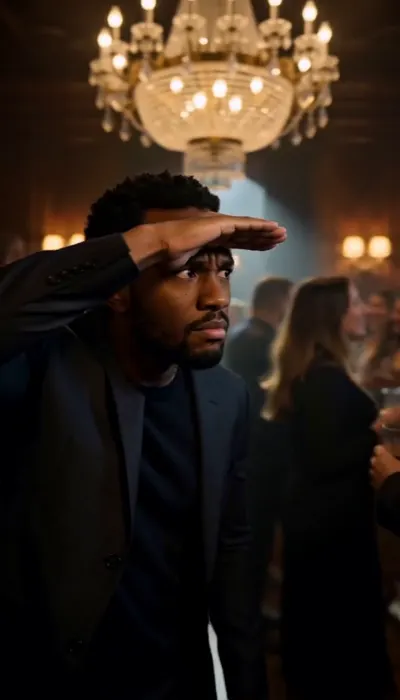
The Scan
- 0:00The search
- 0:03Spotted
- 0:06The point
8s · 9:16 · 720p · from $9.99
Real sample. The person is AI-generated.
This video: 10 credits · 10 videos a month for $29.90, or 40 a year for $100
No subscription needed · Ready in about 3 to 6 minutes · A failed render costs nothing
- Pay once, no subscription
- Failed render: credits back
- Photo deleted after 30 days
- Our own scene and beat, not the music video
8s · 9:16 · 720p · with sound · no watermark · iPhone, Android and desktop · Published October 11, 2026
Sample made on this site from one photo. The person is AI-generated.
- “where she at”
- “POV: you actually came out tonight”
- “guest list: me”
- “they said be there at 9. it is 11.”
- “drinks are on me (allegedly)”
- “left the group chat, entered the party”
- “somebody tell her I am by the stairs”
- “main character, side door”
The trend, in plain words
What is the Burning Bridges AI trend?
The Burning Bridges AI trend is a short-video format where one photo becomes a clip of you leading a house party: a packed, wood-panelled room under crystal chandeliers, a walk out of the crowd, and a hand held flat over your eyes while you scan the room. It borrows the party scene from Drake’s “Burning Bridges” video, and people call the signature move “where she at”.
Nothing is filmed. An AI video model generates the whole shot from a photo. Interest is very recent: in Google Trends, the search “burning bridges ai” went from a daily index of 2 on October 5, 2026 to 56 on October 10, after tutorial clips spread on TikTok on October 8.
This site makes the clip for you. The room, the camera move and the three beats are already set, so you only choose the photo and the moment.
| You add | One photo of one adult |
|---|---|
| You get | 8-second vertical video |
| Format | 9:16, 720p, MP4 |
| Sound | Party beat and crowd, no lyrics |
| Moments | 4: Scan, Pour, Entrance, Toast |
| Ready in | About 3 to 6 minutes |
| Price | 10 credits, from $9.99 |
| Failed render | Credits returned |
Four ways to own the room
Pick your moment
Same party, same chandeliers, a different three beats. Every clip below was made on this site from one photo.
- 01
The Scan
Hand over your eyes, hunting the room, then you spot the lens.
- 0:00Hand over your eyes like a visor, leaning in, hunting the room.
- 0:03You see the lens, light up, and push through the crowd.
- 0:06One point at the camera and the whole room cheers behind you.
The one everybody is posting. Pick it if you are not sure.
- 02
The Pour
You behind the bar: shake, pour for the room, look up.
- 0:00A metal shaker by your shoulder, in time with the beat.
- 0:03Glasses reach in from both sides and you fill each one.
- 0:06Shaker down, eyes up, the room lifts its glasses.
For the host caption: “drinks on me”.
- 03
The Entrance
Double doors open, the room turns, you fix your collar.
- 0:00Both doors swing open and the light catches your face.
- 0:03You walk in and straighten your jacket without slowing.
- 0:06You stop at the lens and give it one nod.
For a birthday, a glow-up or a “guess who is back” post.
- 04
The Toast
On the stairs, glass up, and the whole room answers.
- 0:00From the staircase you raise a glass over your head.
- 0:03Every glass below you goes up under the chandelier.
- 0:06You drop your arm, laugh, and look back at the lens.
For a win, a graduation or a group-chat announcement.
Hover a clip to play it. The people in the samples are AI-generated.
One scene, different faces
It is your face that changes, not the party
The Scan, made on this site from three more photos. Each was the first render of that photo, not a pick from several tries.
THE SCAN · 0:08
THE SCAN · 0:08
THE SCAN · 0:08
Hover or tap a clip to play it. The people are AI-generated; no real person’s photo was used for these samples.
About five minutes, start to post
How to make a Burning Bridges AI video
- 1
Add one photo
A clear photo of just you, facing the camera, with your face and shoulders in frame.
- 2
Pick your moment
The Scan, The Pour, The Entrance or The Toast. Each is three beats in the same chandelier-lit room.
- 3
Download and post
The 8-second vertical clip is ready in a few minutes. Add the sound from the TikTok or Instagram library when you post.
Want the long version, including the do-it-yourself route and what to do when you post? Read how to do the Burning Bridges AI trend.
Thirty seconds that save a retry
Choose a photo that works
The video can only look as much like you as the photo does. This is the difference between a clip you post and one you redo.
Use
- One person, facing the camera
- Face and shoulders both in frame
- Daylight or a bright room
- Your normal look: the party outfit is added for you
Skip
- Sunglasses, a mask or a cap pulled low
- A crop that stops at the chin
- Group photos, or a small face far away
- Anyone who has not agreed, and anyone famous
Three routes to the same clip
Burning Bridges AI generator vs Kling and CapCut
The tutorials use an image-to-video model and an editor. That works, and our prompt page helps you do it. This is what each route asks of you.
| Compared | This site | Kling + CapCut | A general AI video app |
|---|---|---|---|
| You start with | One photo | A photo and a prompt | A photo and a prompt |
| The party room | Built in, four moments | Whatever your prompt gets | Whatever your prompt gets |
| The “where she at” move | Built into The Scan | You describe it and retry | You describe it and retry |
| Sound | Party beat included | Added in CapCut | Varies by app |
| Editing | None | In CapCut | Usually needed |
| What you pay | $9.99 a video, less in packs | Model credits; a plan if you run out | Free credits, then a plan |
| A failed render | Credits returned | Depends on the app | Depends on the app |
Going the do-it-yourself way? Start from our Burning Bridges AI prompt.
The menu
Pay for one video, or stock the bar
One video (8s · 9:16 · 720p, with sound, no watermark) is 10 credits. Packs are paid once and the credits never expire. A render that fails on our side costs nothing.
1 video
Single · 10 credits · $9.99 a video
$9.99
5 videos
Five Pack · 50 credits · $5.80 a videosave 42%
$29
35 videos
Crew Pack · 350 credits · $2.83 a videosave 72%
$99
90 videos
Studio Pack · 900 credits · $2.21 a videosave 78%
$199
300 videos
Agency Pack · 3,000 credits · $1.66 a videosave 83%
$499
Posting every week? Subscribe
Credits refresh each period. Cancel anytime in Billing.
Basic
$29.90/ month
10 videos a month · $2.99 each
Pro
save 44%$49.90/ month
30 videos a month · $1.66 each
Studio
save 58%$99.90/ month
80 videos a month · $1.25 each
Secure checkout by Stripe · Packs are one-time and never expire · Plans renew until canceled
Before you ask
Burning Bridges AI questions
What is the Burning Bridges AI trend?
It is a short-video trend where people put themselves into the house-party scene from Drake’s “Burning Bridges” video: a packed, wood-panelled room under crystal chandeliers, a walk out of the crowd, and a hand held over the eyes while scanning the room. Nobody films anything. An AI video model builds the clip from a photo. It took off on TikTok in the second week of October 2026.
How do I do the Burning Bridges AI trend?
Here: add one clear photo of yourself, pick a moment (The Scan, The Pour, The Entrance or The Toast) and press the button. You get an 8-second vertical clip in about 3 to 6 minutes. The do-it-yourself route from the TikTok tutorials is to write or copy a prompt, run it with your photo in an image-to-video model such as Kling, then cut it in CapCut. Both work; ours skips the prompt and the editing.
What does “where she at” mean in the trend?
It is the name people gave the signature move: one hand flat over the eyes like a visor, slowly scanning the party as if looking for someone. Clips are often captioned with it. Our scene The Scan opens on that move: you hunt the room, spot the camera, then point at it while the crowd cheers.
What app or AI is used for the Burning Bridges trend?
The tutorials going around TikTok mostly use an image-to-video model (Kling is the one named most) plus CapCut for the edit. You do not need either here. This site runs in the browser on iPhone, Android or a computer, with the room, the camera move and the timing already set, so there is nothing to install and no prompt to write.
Is there a Burning Bridges AI prompt I can copy?
Yes. We publish prompts you can paste into your own image-to-video tool, with notes on what each line does and how to fix a face that drifts, on the Burning Bridges AI prompt page of this site (/burning-bridges-ai-prompt). If you would rather not tune a prompt, the maker on this page has the scene built in.
Is there a Burning Bridges AI template on CapCut?
CapCut templates for the trend come and go, and most of them only add the edit (cuts, text, the sound) on top of a clip you still have to generate somewhere else. If you already have a generated clip, a template is a fine way to finish it. If you do not, start here and add the sound in TikTok or CapCut afterwards.
Is Burning Bridges AI free?
Not here. One video is 10 credits, from $9.99, because rendering AI video costs real money for every clip. Free routes exist: image-to-video apps hand out a few free credits, and our prompt page gives you the prompt to use with them. If a render fails on our side, the credits go back to your balance.
How much does one video cost?
One video is $9.99. Five are $29, and 35 are $99 (about $2.83 each). Those are paid once and the credits never expire. Plans start at $29.90 a month for 10 videos and can be canceled anytime.
Is this the real music video? Does it use Drake’s face or song?
No to both. We generate our own party room in the same spirit: wood panelling, chandeliers, a crowd with drinks. You are the only clear face in it. The artist, his likeness, his voice and his music are not used, and this site is not affiliated with him or his label.
Can I post it with the song?
Your clip comes with a party beat and crowd noise, no vocals or lyrics, so it works as it is. To post it with the actual song, upload the clip and pick the sound from the TikTok or Instagram sound library. That way the music is licensed on that platform and your post is not muted.
What photo works best?
One person, facing the camera, in good light, with the face and shoulders in frame. No sunglasses, no heavy beauty filter, no group shot. A photo cropped tight to the chin gives the model nothing of your build to follow, and a small or side-on face is the usual reason a video does not look like you.
Can I use a photo of a friend, a footballer or a celebrity?
Use your own photo, or an adult friend’s with their say-so. Do not upload celebrities, athletes, politicians or anyone who has not agreed, and never children. A lot of the trend’s clips cast famous people; we do not make those. Label your post as AI-generated where TikTok or Instagram asks.
How long does it take, and is there a watermark?
Allow 3 to 6 minutes for the render. The video is 8 seconds, vertical 9:16 at 720p, with sound and with no watermark. You can close the page while it renders; the finished clip waits in My videos.
What happens to my photo?
It is used to make your video and is checked by automated safety classifiers, some run by third-party providers, only to decide whether the content is allowed. The uploaded photo is deleted from our storage 30 days after you add it. We do not use photos to identify people or to build face profiles. The privacy policy has the full wording.
Is this site safe to pay on?
The site opened in October 2026, so it is new, and you should judge it like any new site. Checkout runs on Stripe, so your card details never reach us. You pay once for a video or a pack, credits never expire, and a render that fails on our side returns its credits. The refund policy is linked in the footer, and so is a contact form if you want to ask something first.
What is new on this page
- Site opened with four moments: The Scan, The Pour, The Entrance and The Toast.
The room is waiting. Walk in.
8s · 9:16 · 720p · from $9.99 · a failed render costs nothing